In the digital age, managing multiple online accounts often means forgetting an email address or password, making the login process more of a hassle than it needs to be.
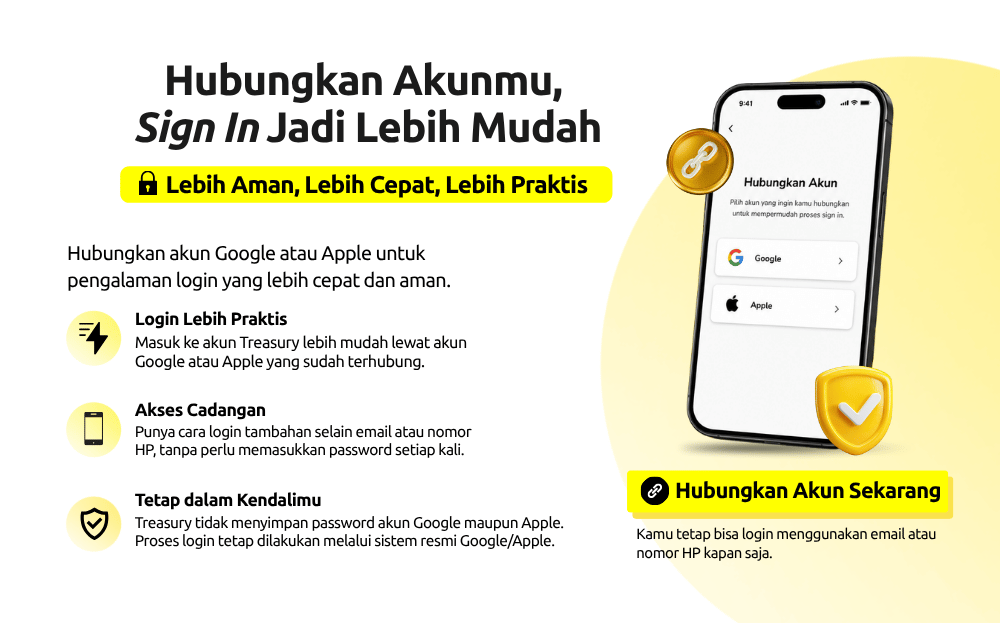
To solve this, Treasury has introduced the Linked Account feature, which allows you to connect your Treasury account to your Google or Apple account. This feature makes logging in faster, easier, and just as secure, without having to type in your email and password every single time.
What Is Linked Account?
Linked Account is a feature that lets you connect your Treasury account to a Google or Apple account as an additional login method. This feature does not create a new Treasury account and does not move any of your investment data. Your gold balance, transaction history, portfolio, and account information remain exactly as they were.
Once your Google or Apple account is connected, you can simply select “Log In with Google” or “Log In with Apple” to access the same account without needing to type your email or password each time.
Why Should You Link Your Account?
Linked Account isn’t just an add-on feature. It’s a solution designed to make your login experience more convenient.
1. Faster Login
Once your Google or Apple account is connected, you can simply select your account without typing your email and password again. The login process becomes quicker and more efficient.
2. More Convenient When Switching Devices
When you get a new device, you usually have to log back into all your apps. With Linked Account, you can use your already-connected Google or Apple account to sign into Treasury without going through a complicated process.
3. No More Worrying About Forgotten Passwords
Keeping track of multiple passwords isn’t easy. With Linked Account, you have an alternative login method that’s more practical, so you won’t need to reset your password as often.
4. More Flexible Login Options
Once your account is connected, you can still choose whichever login method works best for you, whether that’s your email, phone number, Google account, or Apple account.
When Will Linked Account Be Most Useful?
You might be wondering, “If I can already log in using my email or phone number, why would I need to link my account?”
The answer is that your needs can change over time. For example, you might get a new device, reinstall the app, or open Treasury again after not using it for a while. In situations like these, Linked Account comes in handy because you don’t need to remember an old password or go through a reset process.
This feature also works as a backup. If one login method ever runs into an issue, you still have another way to access your Treasury account.
In short, Linked Account offers long-term convenience, not just for today’s login, but for using the Treasury app well into the future.
Is Linked Account Safe?
Absolutely.
The security of user accounts and data is Treasury’s top priority. That’s why the account linking process uses the official authentication mechanisms provided by Google and Apple.
Throughout this process:
- Treasury does not store your Google or Apple account password.
- All authentication is handled through Google’s or Apple’s official pages.
- Data is transmitted through an encrypted connection.
- Your account can only be linked if you explicitly approve it.
- You retain full control over which accounts are connected.
Linked Account simply adds a new way to log in. Treasury cannot view or store your Google or Apple account password.
What Happens After Your Account Is Successfully Linked?
Once the process is complete, the Google or Apple account you selected becomes one of the login options for your Treasury account.
From that point on, every time you open the Treasury app, you can simply choose your preferred login method without having to type your email and password every time. Most importantly, this process does not change your Treasury account identity. All of the following data remains exactly the same:
- Gold balance
- Investment portfolio
- Transaction history
- Profile data
- Activity history
- Account settings
Linked Account only makes the login process more convenient. Your investment data stays safe and unchanged.
How to Link Your Account on Treasury
Linking your account takes less than a minute. Just follow these steps:
- Open the Treasury app.
- Go to the Profile menu.
- Select the Linked Account menu.
- Choose the account you want to link, either Google or Apple.
- Follow the verification steps as prompted.
- Once complete, your account is linked and ready to use for your next login.
Manage Your Accounts Your Way
Treasury gives you full flexibility to manage your connected accounts. If you ever want to switch to a different Google account or move to a different Apple ID, you can adjust this through the Linked Account menu on your Profile page.
Linking an account doesn’t remove the option to log in using your email or phone number. You can still use your previous login methods. All login options remain available, so you’re free to choose whichever one feels most comfortable.
This flexibility ensures that your experience with the Treasury app stays tailored to your needs, without affecting your investment activity.
FAQ (Frequently Asked Questions)
- Will Linked Account create a new Treasury account?
No. Linked Account only adds a new login method to the Treasury account you already have.
- Will my gold balance change?
No. Your gold balance, investment portfolio, transaction history, and account data all remain the same.
- Does Treasury store my Google or Apple account password?
No. Your password is managed by Google or Apple. Treasury does not know and does not store those account passwords.
- Can I still log in using my email or phone number?
Yes. After linking your account, you can still log in using your email, phone number, Google, or Apple account.
- Can I unlink a connected account?
Yes. You can manage or disconnect linked accounts through the Linked Account menu at any time.
Log In Faster, Invest with Ease
Treasury remains committed to delivering a digital investment experience that’s increasingly simple, secure, and comfortable. Through the Linked Account feature, which connects your Google or Apple account, you can log in faster, reduce the risk of forgetting your password, and have more ways to access your Treasury account across different devices.
Because a great investment experience doesn’t just start with buying gold. It starts with being able to access your account easily, whenever you need it.
Connect your account now and enjoy a sign-in experience that’s faster, more practical, and more secure with Treasury.